Copilot in Excel, the Claude for Excel add-in, or an AI that works on the file open on your screen. What each can change on a Mac, and what it needs.
On a Mac you can have AI edit an Excel file in three ways: Microsoft's Copilot inside Excel, Anthropic's Claude for Excel add-in, or an app such as Incredible that works on the file open on your screen. The first two live in a pane inside one workbook; Incredible works across workbooks, PDFs and websites, and it starts from a key you hold rather than a pane you open.
What each can do, and what each needs, is below. The Microsoft and Anthropic details are from their own documentation, read on 4 October 2026.
Copilot is Microsoft's own AI, inside Excel. Microsoft's page on editing with Copilot lists Excel on Mac next to Windows and the web, all three with edit, chat and plan modes. You open it from Home, Copilot.
In edit mode it changes the workbook directly. Microsoft's list includes adding, renaming and deleting sheets, changing values and ranges, formatting and conditional formatting, data validation, formulas across several sheets, and charts and PivotTables.
The catch is the licence. Microsoft says Copilot "might not be included with your Microsoft 365 subscription or available based on your organization's settings". If you have it, it is the most natural place to start, since it is already in the ribbon.
Claude for Excel is an add-in that opens Claude in a sidebar. Anthropic's documentation says it runs on Excel for Mac version 16.46 or later, build 21011600 or later, and needs a Claude Pro, Max, Team or Enterprise plan. You install it from Microsoft's add-in store and open it from Tools, Add-ins.
It is made for models. It answers questions about a workbook with links to the exact cells, changes an assumption while keeping the formulas that depend on it, traces errors such as #REF! to their cause, and fills in templates. It can also sort, filter, edit PivotTables and add conditional formatting. Anthropic lists what it does not support: data tables, and macros and VBA. It also warns that a workbook from outside can carry hidden instructions, and asks you to confirm risky changes.
If your Excel work is financial models, this is the most specialised of the three.
Incredible is an app on your Mac that clicks and types in your apps, files and browser. With an Excel file open, you point at what you want changed, hold the fn key and say it, and Incredible makes the change in the file. It works the same way in PowerPoint and on PDFs.
"Add a totals row to the bottom of that spreadsheet and bold the header."
It can also start a file from nothing and save it where you say, as the Files guide shows:
"Create an Excel file tracking this quarter's marketing spend, with columns for date, channel, amount, and notes, and save it to my Desktop."
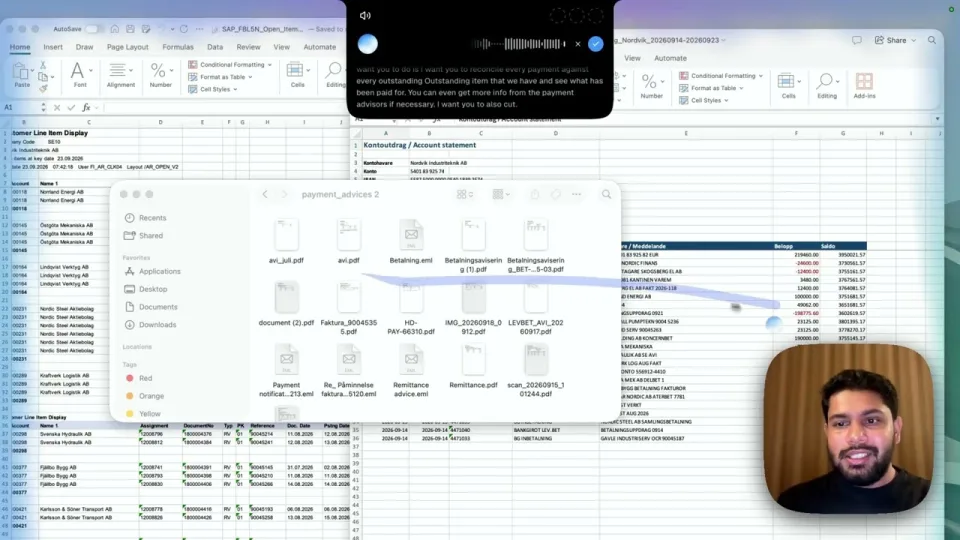
Unlike the two add-ins, Incredible does not need the job to stay inside one workbook. In the spreadsheets recording, it is asked to match every payment in a bank statement against a list of open invoices, with a folder of payment advice PDFs to check when a payment is unclear. In the recording of everyday tasks, it looks up companies in Chrome and lists them in a spreadsheet. A sheet job you repeat every week can be taught once and then run on a schedule. See how teaching works.
It does not need a Microsoft 365 Copilot licence or an add-in. It runs on macOS 13 or later and on Windows 10 or later. Before anything is sent to someone else, it asks first.
If your company already pays for Copilot, use it for changes inside a workbook. If you build or audit financial models and pay for Claude, the Claude add-in is made for that work.
If your Excel work involves other files and other apps, such as PDFs to check against, a website to copy from, or a report to send when it is done, try Incredible. It is free for 7 days with no card. Download it.
For how Incredible compares with Claude, ChatGPT and the other AI apps on a Mac, see the best AI for Mac in 2026.
Yes. Microsoft lists Excel on Mac among the platforms for Copilot in Excel, with edit, chat and plan modes. Microsoft also says Copilot might not be included with your Microsoft 365 subscription or may be turned off by your organization.
Yes. Anthropic says the add-in runs on Excel for Mac version 16.46 or later, build 21011600 or later. It needs a Claude Pro, Max, Team or Enterprise plan.
Yes. Incredible works on the Excel file open on your screen: point at what you want changed, hold the talk key and say it, and it makes the change in the file. It can also create a new Excel file and save it where you ask.
Yes. Incredible combines, matches and checks data across several large sheets. A recording on its use cases page shows it asked to match the payments in a bank statement against a list of open invoices, with payment advice PDFs beside them.
It clicks and types in your browser, files and apps, exactly like you do.
Requires macOS 13 or Windows 10, or later.
 Download for Mac
 Download for Windows