 Download for Mac
 Download for Windows
A routine is work an agent does on its own, without you asking each time. It can run at a time you choose, like every Monday at 9. Or it can check for something, like a new invoice arriving, and do the work only once that has happened.
Each routine belongs to one agent and runs in that agent's chat, so you can always see what it did.
Where routines live
Open an agent and look in its panel, on the Agent tab, under Routines. Each routine has its own row with:
- its name and when it runs, like "Every Monday at 09:00"
- when it last ran, and whether it did the work ("Ran") or found nothing to do ("Checked, nothing new")
- a play button (Run now) to run it straight away
- a switch to Pause it or Turn on again
An agent with no routines says "None yet. Ask it to do something on a schedule."
Set one up
You set up a routine by asking for it, in plain words. Say what should happen and when. You can ask Incredible, which gives the work to the right agent, or write to the agent in its own chat.
"Every weekday at 9, send me the three most important news stories about electric cars."
 Try in Incredible
"Every Friday at 4, send me a short summary of this week's emails."
Try in Incredible"Every morning at 8, tell me what's on my calendar today."
Try in IncredibleYou can also click + next to Routines in an agent's panel (Add a routine). The agent asks you what the routine should do.
When you are in an agent's chat and it just did something you want again, ask it to repeat it.
"Do this every Monday at 9 from now on."
Every run uses some of your usage. If you don't say how often, the agent picks once a day and tells you what it chose. You can change it anytime.
Routines that wait for something
Some routines have something to wait for, like "A new invoice is overdue". Open one of these and you see it under Waits for.
On each run, the agent first checks whether it has happened. If it hasn't, the run ends quietly and the row says "Checked, nothing new". If it has, the agent does the work.
"When an email with an invoice arrives, save the PDF to my Invoices folder."
Try in Incredible"When Sarah replies to my proposal, let me know."
The agent needs to be able to see what it waits for, so the app it happens in has to be connected. See Apps.
Open a routine
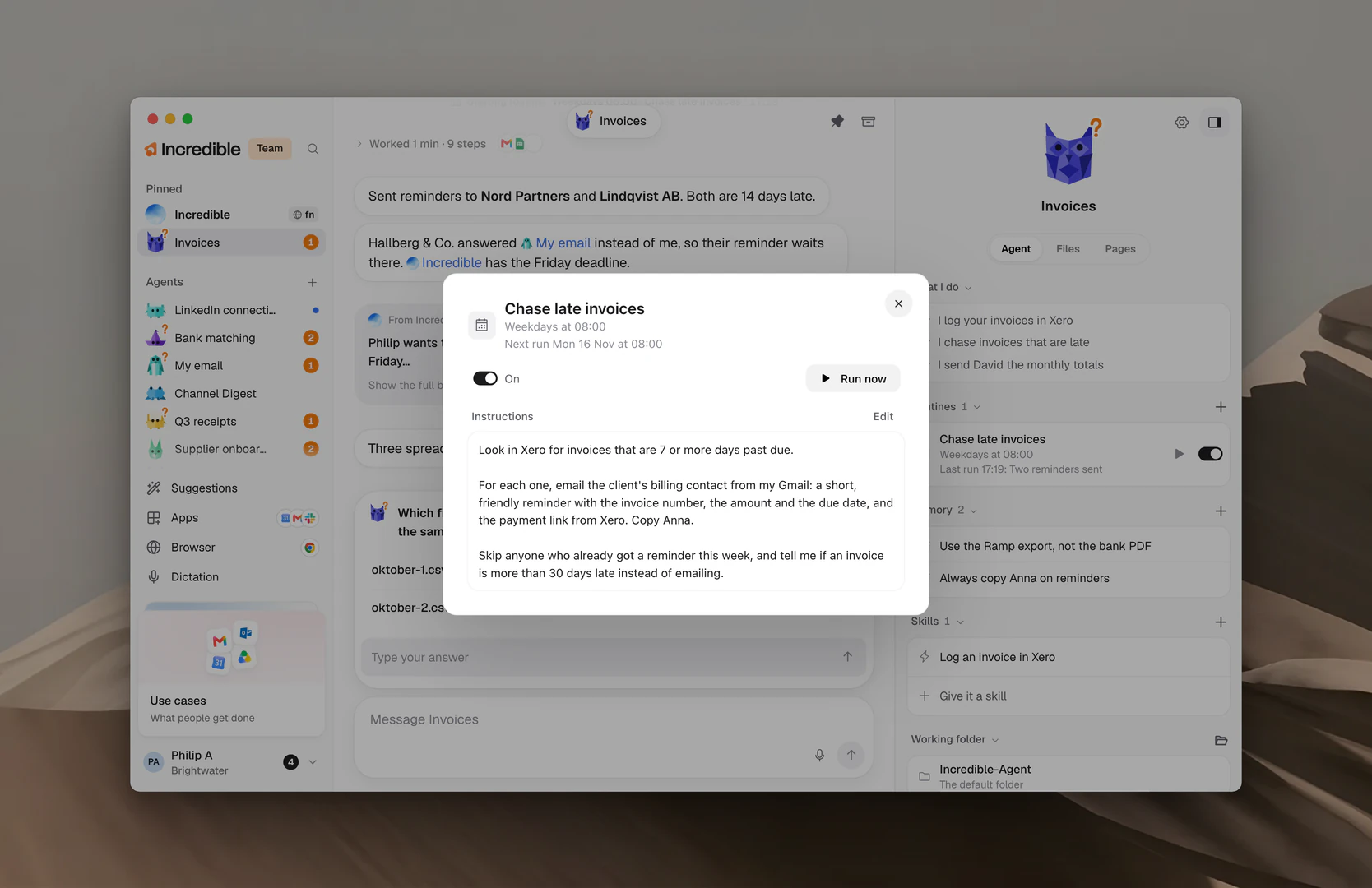
Click a routine's name in the panel to open it. You see:
- when it runs, and "Next run" with the next time
- the On switch (it reads Paused when off) and Run now
- Waits for, on a routine that checks first
- Instructions: exactly what the agent is told to do on each run
To change the instructions, click Edit, change the words, and click Save. Cancel leaves them as they were.
Change, pause or delete a routine
- Change it. Edit its Instructions, or ask the agent in its chat.
- Pause it. Turn off its switch. It keeps its setup, ready to switch on again.
- Delete it. Open it and click Delete routine at the bottom. Incredible asks first. A deleted routine stops running for good.
"Make the Monday report run on Tuesdays instead."
A routine can also be paused for you. "Paused while archived" means its agent is archived; bringing the agent back switches it on again. If the agent switched it off itself, the row says so with the agent's name.
When a routine runs
Each run shows in the agent's chat as "Starting routine:" with the routine's name, followed by the work it did.
A routine does the work you set it up for without asking each time, in the apps it was set up with. Anything outside that, and anything it would delete, still waits in Needs you. If you want to approve each run, say so when you set it up.
In a team set to Strict under Review before acting, routines ask too.
Routines run on your computer
Routines run on your computer while Incredible is open. If the app was closed when a routine was due, it runs once when you open Incredible again. A timed routine that is more than 18 hours late is skipped.
To see how much of your usage an agent's routines take, open the agent's Settings and click Usage. See Agent settings and models.
Related guides
- Give an agent work: what a run looks like in the chat
- Needs you and approvals: what an agent asks before it acts
- Apps: connect the apps a routine works in
- Agent settings and models: see what routines use
- Skills: jobs an agent does the same way every time