 Download for Mac
 Download for Windows
Incredible remembers things in two places. Incredible's memory holds what is true about you and your work everywhere: who people are, how you like things written, files you want it to know. Every agent can use it. An agent's rules are what is true for that one agent only, like "always book meetings a week out".
A simple way to choose: if it is true outside one agent, put it in Incredible's memory. If it is only about how one agent does its job, make it a rule for that agent.
Incredible's memory
Incredible's memory holds notes and files. Incredible and your agents read it when they work, so you do not have to explain the same thing twice.
To open it, go to Settings → Memory. When you open a note from Search (⌘K on a Mac, Ctrl+K on Windows), it opens in a tab beside Incredible's chat instead.
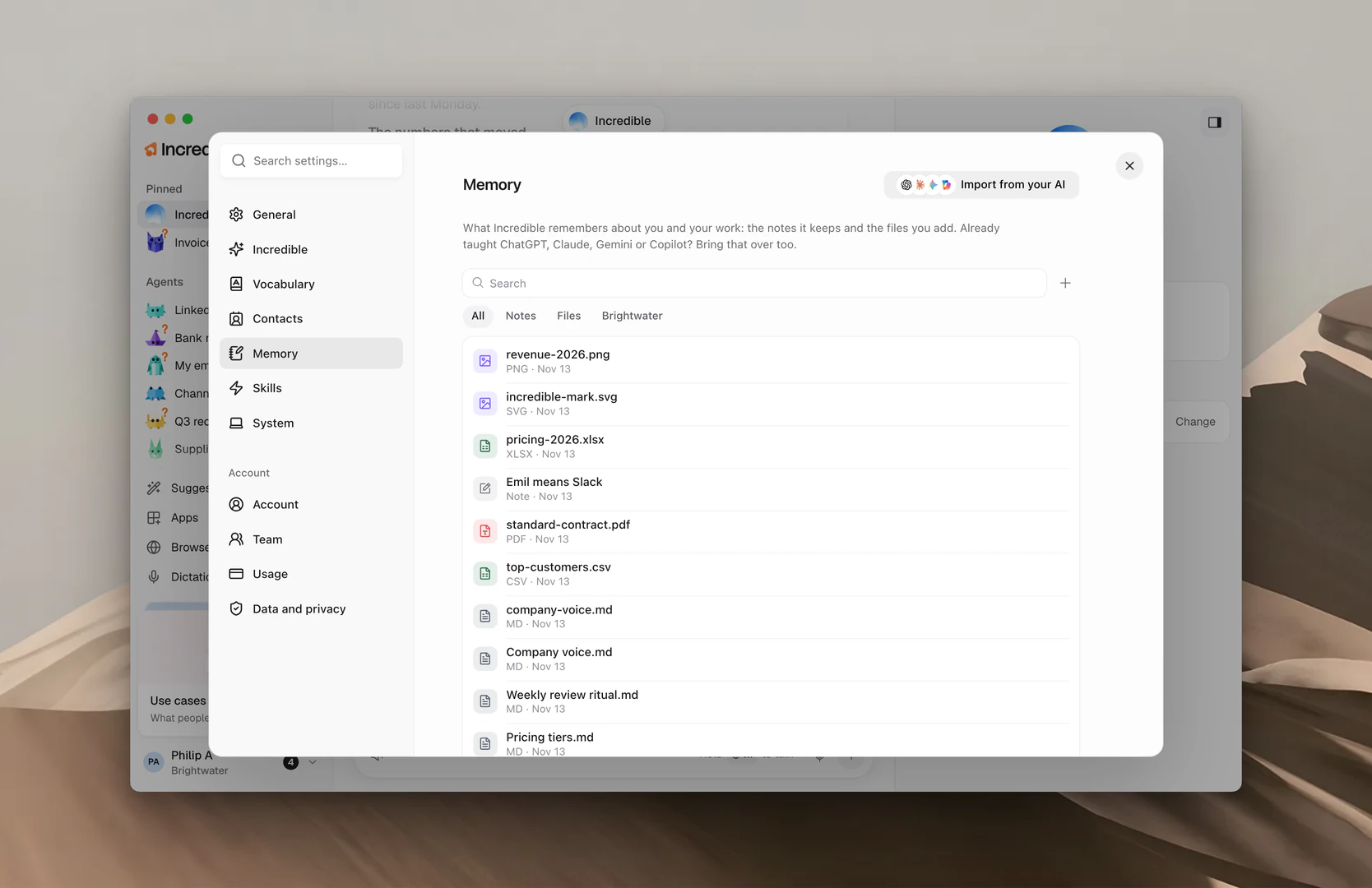
The list shows your notes and files, newest first. Use the filters at the top to show All, only Notes or only Files. If you are in a team, a filter with your team's name shows what the team shares.
Add to memory
Say it. Tell Incredible what to remember, and it writes the note for you.
"Remember that I sign my emails 'Best, Sam'."
"Remember that Nikola is our contact at Northwind and prefers short emails."
In the app. In Settings → Memory, click + (Add to memory) and choose:
- New note: write it yourself. A note has a Name, When it applies and The note. Click Save.
- Upload a file: add a document you already have, up to 10 MB. Write a line saying what it is and when Incredible should use it, then click Save.
"When it applies" is how Incredible finds the right note. Write it like a note to a colleague: "When I ask to message Emil".
Ask what it remembers
You can always ask Incredible what it knows, in its chat or with the talk key.
"What do you remember about me?"
 Try in Incredible
Import from your AI
If you already use ChatGPT, Claude, Gemini or Copilot, you can bring what they know about you into Incredible.
- Open Settings → Memory and click Import from your AI.
- Click the AI you use now.
- Click Let Incredible do it or Copy and paste it myself.
Let Incredible do it opens that AI in your browser, asks it what it remembers about you, and saves the answer. You need to be signed in to that AI in your browser. The new notes show up in your memory when it is done.
Copy and paste it myself gives you a prompt to copy into that AI. Paste its whole answer back and click Review. Untick anything you do not want kept, then click Save. The button says how many facts it saves.
You can change or delete any of it later.
Change or delete a note
Open a note from the list and click Edit to change it, then Save. To remove it, click Delete and confirm. Incredible forgets the note, and this cannot be undone.
For a file, open it and click Edit (or Open for a file that is not text) to change its description or contents. Delete removes the file from Incredible's memory.
You can also say it:
"Forget that I sign my emails 'Best, Sam'."
Share memory with your team
In a team, open one of your files and click Share, then choose Everyone in your team. Incredible uses it for everyone in the team, and it moves to your team's filter. Choose Only you to stop sharing.
A file a teammate shared opens read-only. Click Make a copy to get your own version you can change. See Teams.
An agent's rules
Each agent has its own Memory in its panel, on the Agent tab. These are its rules: short lines it follows every time it works.
Add a rule. Click + (Add a rule) next to Memory, type the rule, and click Save. You can also tell the agent in its chat.
"Always copy Anna on reminders."
Change a rule. Click it, then Edit. Change the words and click Save, or Cancel to keep it as it was.
Delete a rule. Click it, then Delete and confirm. The agent stops following it.
An agent with no rules says "No rules yet. Tell it how you like things done."