Download for Mac
 Download for Windows
How to Extract Data from a Website into Excel with AI (2026)
An AI web scraper you talk to: say what you want and get a formatted Excel file, even across nine pages. Plus Excel, Google Sheets and Power Automate.
 Emil WagmanCTO
The short answer
Open the page with the results, hold Incredible’s key and say what you want, for example "take all of these 213 results and make them into a nicely formatted spreadsheet." It goes through every page of results in your own browser and saves an Excel file. For one plain table on a public page, Excel’s own From Web import or Google Sheets’ IMPORTHTML function can do it.
Free for 7 days. Mac and Windows.
You found the list you need: 213 suppliers on a company register, spread over nine pages of results. Copying it into Excel by hand would take the afternoon, and the site has no export button.
You can ask for it instead. With Incredible on your Mac or Windows PC, you open the page, hold one key and say what you want in the spreadsheet. It goes through every page of results in your own browser and saves an Excel file. The recording above shows it on a real search: all 213 Volvo companies on allabolag.se, a Swedish company register.
Everything below about Microsoft and Google comes from their own help pages, read on 21 November 2026.
What you say to Incredible

Open the page with the data, hold the talk key (fn on a Mac, Ctrl and Space on Windows) and say it the way you would to a colleague:
"Can you take all of these 213 results for Volvo and make them into a nicely formatted spreadsheet?"
You don't name the columns, point at the table or write a rule. Incredible looks at the page you are on, works out where each result's name, number, phone and address are, and starts.
It works in your own Chrome, or another Chromium browser such as Edge, Brave or Arc, so a site you are signed in to looks the same to it as it does to you.
Results spread over many pages

Most lists worth having are not one table on one page. Here the results came as cards, nine pages of them, with the phone number, address, revenue and number of employees on each card.
Incredible wrote down what it found on page one (213 companies, nine pages, the fields on each card) and went through the pages one by one. Its plan stays open in a small panel while it works: collect all 213 results, build the spreadsheet, then check that the file exists and the counts match. You can keep working in another window while it does.
What comes out
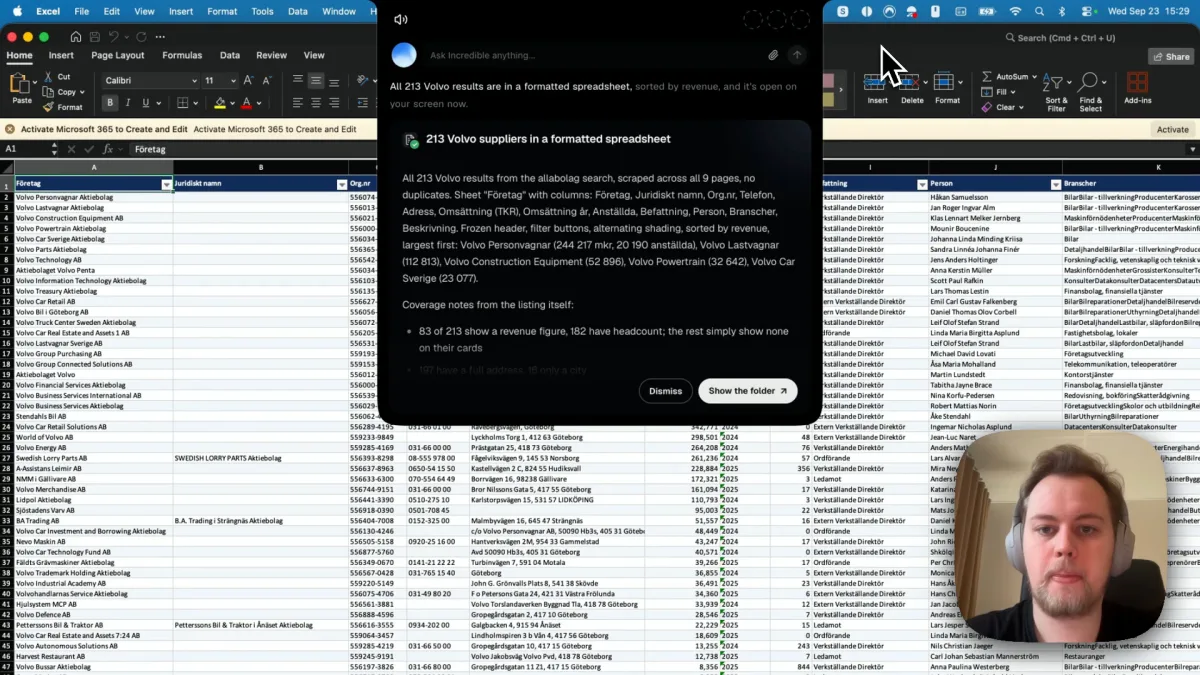
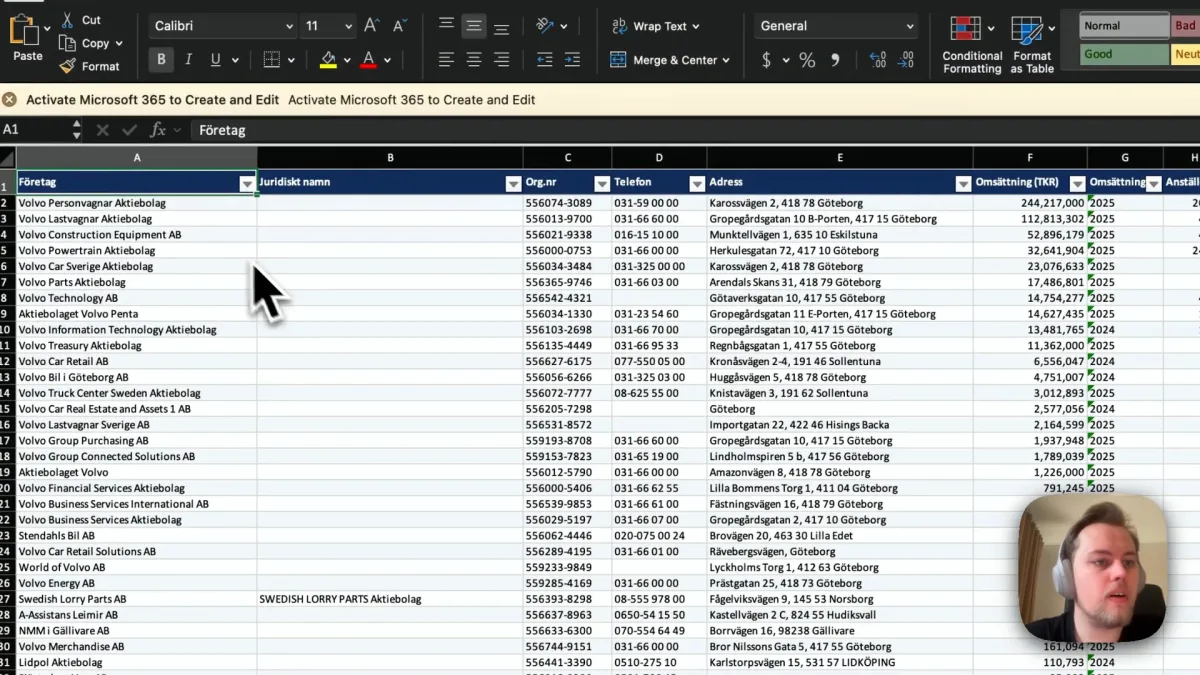
A few minutes later the file was open in Excel: 213 rows, no duplicates, 12 columns (company, legal name, organization number, phone, address, revenue, revenue year, employees, role, person, industries and a description), sorted by revenue with the largest first. The header row was frozen, with filter buttons and alternating shading.
It also said what was missing. Only 83 of the 213 companies show a revenue figure on the site, so the other cells are empty rather than guessed. Read that kind of note before you send the file on.
The same request works for other lists: "put every product on this page in a spreadsheet with the price and the link", or "make a sheet of these job ads with the company and the location". A list you pull every week can be saved as a task and run on a schedule.
The other ways to get website data into Excel
Excel's From Web import. In Excel, go to Data and select From Web, then paste the page address. Microsoft's help page says it lists the tables it detects on the page as Suggested Tables, and Add Table Using Examples lets you type a few values so it finds data that is not in a table. For sites that need a sign-in, the import supports anonymous, Windows, basic, Web API and organizational accounts (Microsoft). Microsoft's pages don't say whether it works in Excel for Mac.
Google Sheets' IMPORTHTML. Type =IMPORTHTML(url, "table", 1) in a cell. Google's help page says it imports data from a table or a list in an HTML page. Then download the sheet as an Excel file from the File menu.
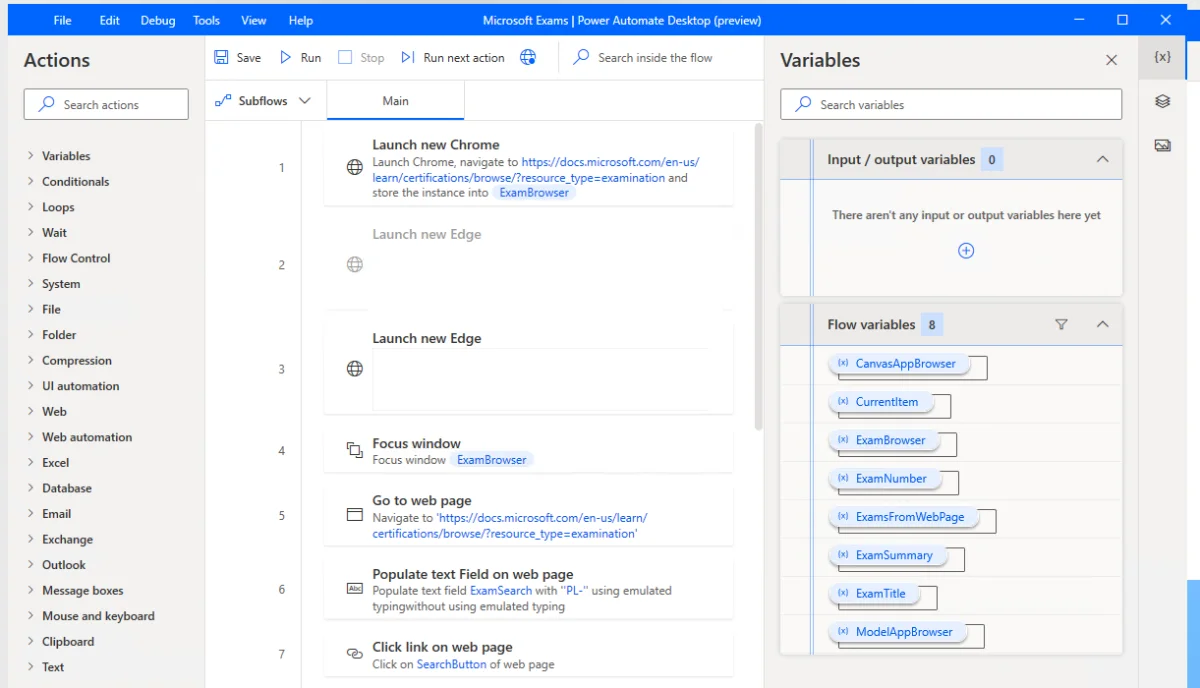
Power Automate for desktop. Its "Extract data from web page" action takes single values, lists, rows or tables from a page and can store them in an Excel spreadsheet (Microsoft). You build the flow step by step, and it runs on Windows only; see Power Automate on a Mac.
Which to use. For one plain table on a public page, Excel's import or IMPORTHTML is quick, and you already have them. When the data is in cards, spread over many pages, or behind your login, or you just want to say what you need and get the file, ask Incredible.
Try this now. Open a page of search results, hold the key and say: "Put all of these results in a spreadsheet." Incredible is free for 7 days on Mac and Windows. Download it, or read the Quickstart first.
For the opposite job, typing rows from a spreadsheet into a website, see how to automate data entry from Excel into a web form. For more on what an AI can do in your browser, see AI that can browse the web for you, and for Excel work in general, the best AI for Excel.
If the list you need is prospects to call, see how to use AI to find leads, which reads the same recording as a call list.
For every Excel job on one page, see how to automate Excel tasks with AI.
Frequently asked questions
How do I extract data from a website into Excel?
For one table on a public page, use Data > From Web in Excel and pick the table. When the data is spread over many pages, sits in cards instead of a table, or is behind your login, ask Incredible: open the page, hold its key and say "put all of these results in a spreadsheet." It collects every page in your browser and saves a formatted Excel file.
Can AI extract data from a website for me?
Yes. In our recording, Incredible collected 213 companies from nine pages of search results on a company register and saved them as an Excel sheet with 12 columns, sorted by revenue, with no duplicates. It works in your own Chrome, Edge, Brave or Arc, signed in as you.
Is there an AI web scraper that needs no code?
Yes. With Incredible you write no code and set up no selectors: you open the page and say what you want in the spreadsheet. In our recording it scraped 213 results from nine pages of a company register into an Excel file, in the browser you already use.
Can I extract data from a website to Excel on a Mac?
Yes. Incredible runs on macOS 13 or later and on Windows 10 or later, and works in the browser you already use. Microsoft’s pages on Excel’s From Web import do not say whether it works in Excel for Mac, and Power Automate for desktop is a Windows application.
Is there a free way to get data from a website into Excel?
Excel’s From Web import comes with Excel in Microsoft 365, and Google Sheets has the IMPORTHTML function, which imports a table or list from a web page into a sheet you can then download as an Excel file. Both work best on a plain table on a public page. Incredible is free for 7 days.
Can it get data from a website I have to log in to?
Incredible works in your own browser, so it sees the pages you are already signed in to, with nothing to give it. Excel’s web import supports several sign-in types, such as basic and organizational accounts, which you set up in the import.