 Get started on macOS
 Get started on Windows
Incredible vs Wispr Flow
A voice assistant that carries out the work, compared with a dictation tool that writes the words.
TL;DR
- Incredible includes polished dictation and goes further: a spoken request can become an action across 3,000+ connected apps, with approval before consequential steps.
- Wispr Flow is a focused dictation product for turning speech into polished text on desktop and mobile, with deep vocabulary, snippet, and formatting controls.
- Wispr Flow has a lower entry price and faster setup for dictation alone. Incredible starts at $50 to $59 per seat per month because it covers both voice input and the work that follows.
- Choose by the outcome you want: completed work with Incredible, or a dedicated voice keyboard with Wispr Flow.
Incredible vs Wispr Flow at a glance
| Feature | Incredible | Wispr Flow |
|---|---|---|
| Voice dictation | Built in, with cleanup, tone, vocabulary, hands-free mode, and history | The core product, with deeper formatting, vocabulary, snippets, styles, and 100+ languages |
| Actions across apps | Can search, draft, send, update, and run multi-step work with approval | Primarily inserts text and manages notes rather than operating apps |
| Meeting notes | No dedicated meeting-notetaker product | Dedicated Notetaker on Mac |
| Platforms | Mac and Windows | Mac, Windows, iPhone, and Android |
| Setup | Install, grant permissions, then connect apps for actions | Install, grant permissions, choose a shortcut, and dictate |
| Free access | 14-day Pro trial | Ongoing free plan with weekly limits |
| Paid starting price | $50/seat/month billed annually; $59 monthly | $12/user/month billed annually; $15 monthly |
Prices are list prices before tax, checked August 28, 2026. See Incredible pricing and Wispr Flow pricing for current terms.
Disclosure: We make Incredible. The comparison below includes Wispr Flow’s specialist advantages and the limitations of both products.
Is Incredible a Wispr Flow alternative?
Incredible is a Wispr Flow alternative for buyers who want voice input to trigger work, not a like-for-like dictation replacement. Wispr Flow is a dictation product: you speak, it removes filler words and self-corrections, formats the result, and puts polished text into the field where your cursor is. Its Notetaker applies the same voice-first approach to meetings and voice memos.
Incredible is a broader desktop assistant that includes dictation. You can use it to put polished text under your cursor, or ask it to do the task behind the words: find a customer email, draft and send a reply, update a spreadsheet, create a calendar event, or carry out a workflow across multiple apps.
That makes the products overlap at the point of voice input but diverge at the output. Wispr Flow usually finishes with text or notes. Incredible can finish with text or continue until the requested work is done.
How does dictation compare?
Wispr Flow specializes in the daily voice-typing experience: personal vocabulary, snippets, writing styles, automatic formatting, transcript history, and support for 100+ languages. It also works on iPhone and Android, which matters if you want the same habit away from your computer.
Incredible’s dictation covers the essentials: hold-to-talk and hands-free modes, speech cleanup, tone controls, vocabulary, and history. It works in any text field on Mac and Windows. The distinction is not that Wispr Flow can dictate and Incredible cannot; it is that Wispr Flow specializes in dictation while Incredible treats dictation as one way to use a larger assistant.
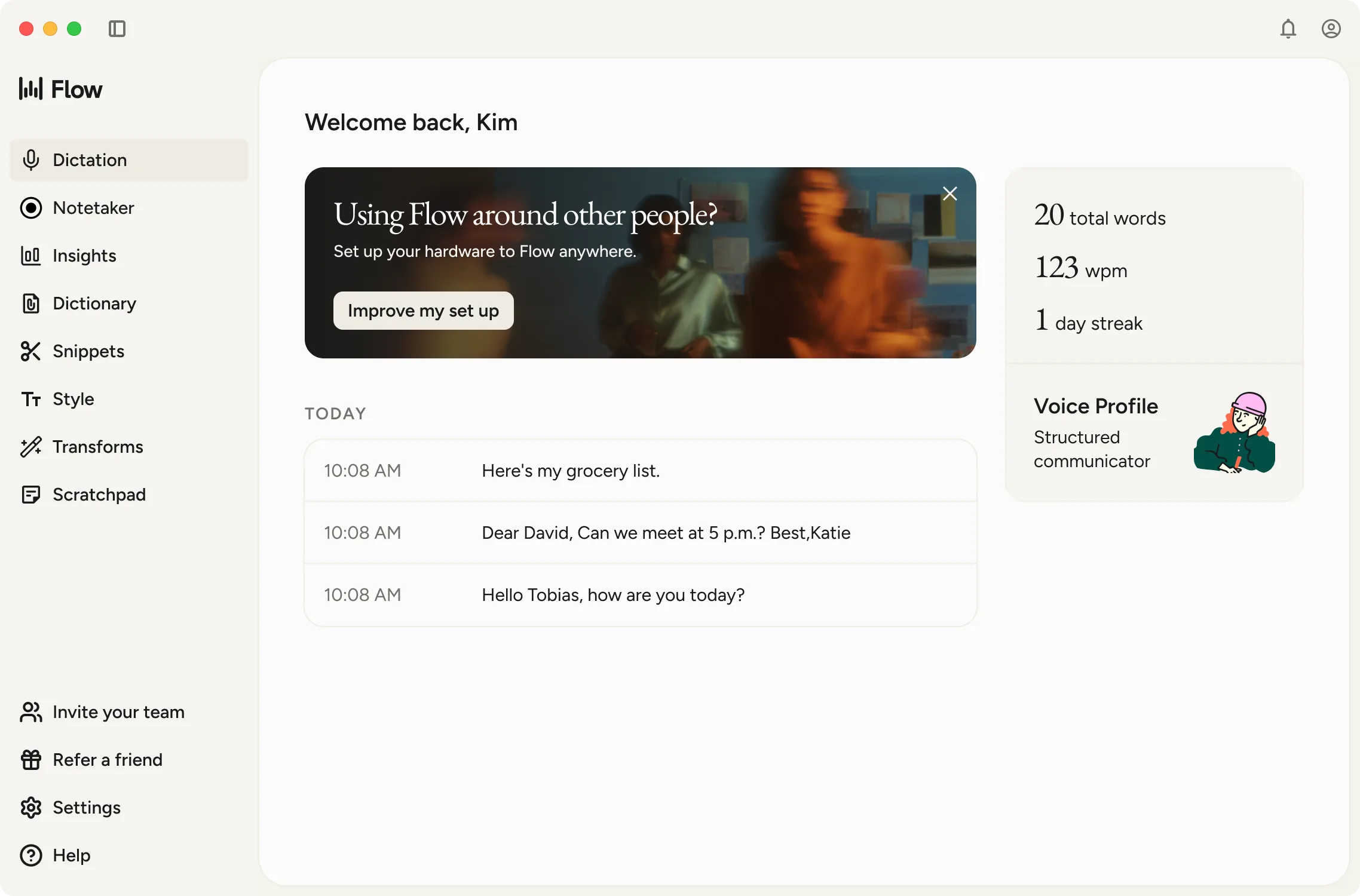
Choose Wispr Flow if most of your voice use is drafting emails, documents, messages, code, or notes. Choose Incredible’s dictation if you want voice typing inside the same product you use to delegate desktop tasks.
What can each tool do after the words are written?
Wispr Flow can organize transcripts, produce meeting notes, connect those notes to calendars and Slack, and make notes available to supported AI tools. Those features extend the value of captured speech, but the core interaction still produces text or a note for you to use.
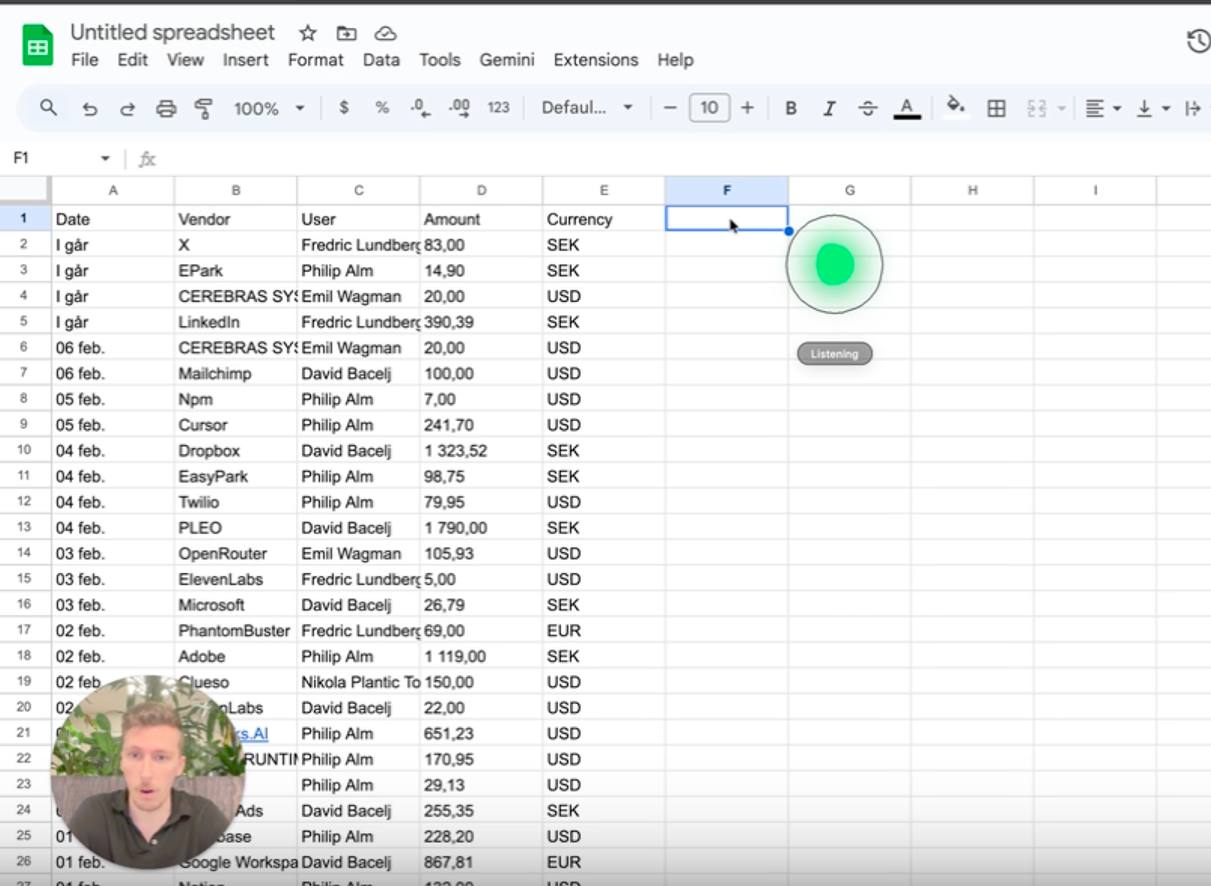
Incredible is designed to continue into the work itself. It connects to 3,000+ apps and can act on a spoken or typed request. Instead of dictating “Tell Sarah I will review the contract today” and then sending it yourself, you can ask Incredible to find Sarah’s email, draft the reply, show it to you, and send it after approval.
The same distinction applies to spreadsheets, calendars, browsers, and repeatable workflows. Wispr Flow helps you express the instruction quickly. Incredible can interpret the instruction and carry it out across connected apps.
How do price and setup compare?
Wispr Flow is less expensive and faster to set up for its core job. Its free plan has weekly dictation limits, while Pro costs $15 per user monthly or $12 per user per month with annual billing. Install the app, grant microphone and accessibility permissions, choose a shortcut, and you can start dictating. Wispr Flow says most people complete setup in about five minutes.
Incredible has a 14-day Pro trial. Paid plans start at $59 per seat with monthly billing or $50 per seat per month with annual billing. Basic dictation works after installation and permissions, but using the assistant for actions also means connecting the apps it should work in. Teaching workflows or adding company knowledge takes additional time.
The price difference reflects the scope difference. Wispr Flow is the better-value purchase if voice typing is the problem. Incredible costs more because it is intended to handle both voice input and the work that follows.
Which tool should you choose?
Choose Incredible when you want a spoken request to continue beyond the words. It can turn an instruction into an action across connected desktop apps, with approval before consequential steps. That broader role takes a little more setup, but it can remove the work that normally follows dictation.
Choose Wispr Flow when the entire job is replacing typing with polished dictation. It is focused, supports desktop and mobile, and gives frequent writers deeper control over vocabulary, formatting, snippets, and writing styles at a lower entry price.
The deciding question is simple: do you want to say the words, or hand off the work? Wispr Flow excels at the first. Incredible is built for the second.
Frequently asked questions
Is Incredible a Wispr Flow alternative?
Yes, if you want voice input to lead to actions across your apps. It is not a like-for-like dictation replacement: Wispr Flow focuses on turning speech into polished text and meeting notes, while Incredible also carries out tasks across connected desktop apps.
Which is better for voice dictation, Incredible or Wispr Flow?
Wispr Flow is the safer pick when dictation is the whole job: it is focused, mature, and available on desktop and mobile. Incredible is the better fit when you want good dictation inside the same assistant you use to complete tasks across apps.
Can I use Incredible and Wispr Flow together?
Yes. You can use Wispr Flow for high-volume writing and mobile dictation, then use Incredible for tasks that need actions across desktop apps. Their dictation features overlap, so using both makes the most sense when you value Wispr Flow’s mobile reach or specialist controls.
Which is cheaper, Incredible or Wispr Flow?
Wispr Flow has a lower entry price if you only need dictation. It has a free plan, and Pro costs $15 per user monthly or $12 per user monthly with annual billing. Incredible has a 14-day Pro trial, then starts at $50 per seat monthly with annual billing or $59 with monthly billing because it covers a broader assistant and automation job.
Keep comparing
 ZapierA voice-first assistant that works across your apps the moment you ask, compared with a cloud platform for automations that run without a person present.Incredible vs
 ChatGPTA voice-first assistant that operates your desktop apps, compared with the general AI assistant built around answers, writing, and research.Incredible vs
 Claude CoworkA voice-first assistant that operates your apps, compared with an agentic workspace built for research, files, and code.Incredible vs
 Google GeminiA voice-first assistant that operates all your apps on Mac and Windows, compared with Google's AI across its own apps and devices.