下载 Mac 版
 下载 Windows 版
打开侧边栏底部的个人资料菜单,点击 Settings,再点击 Account。
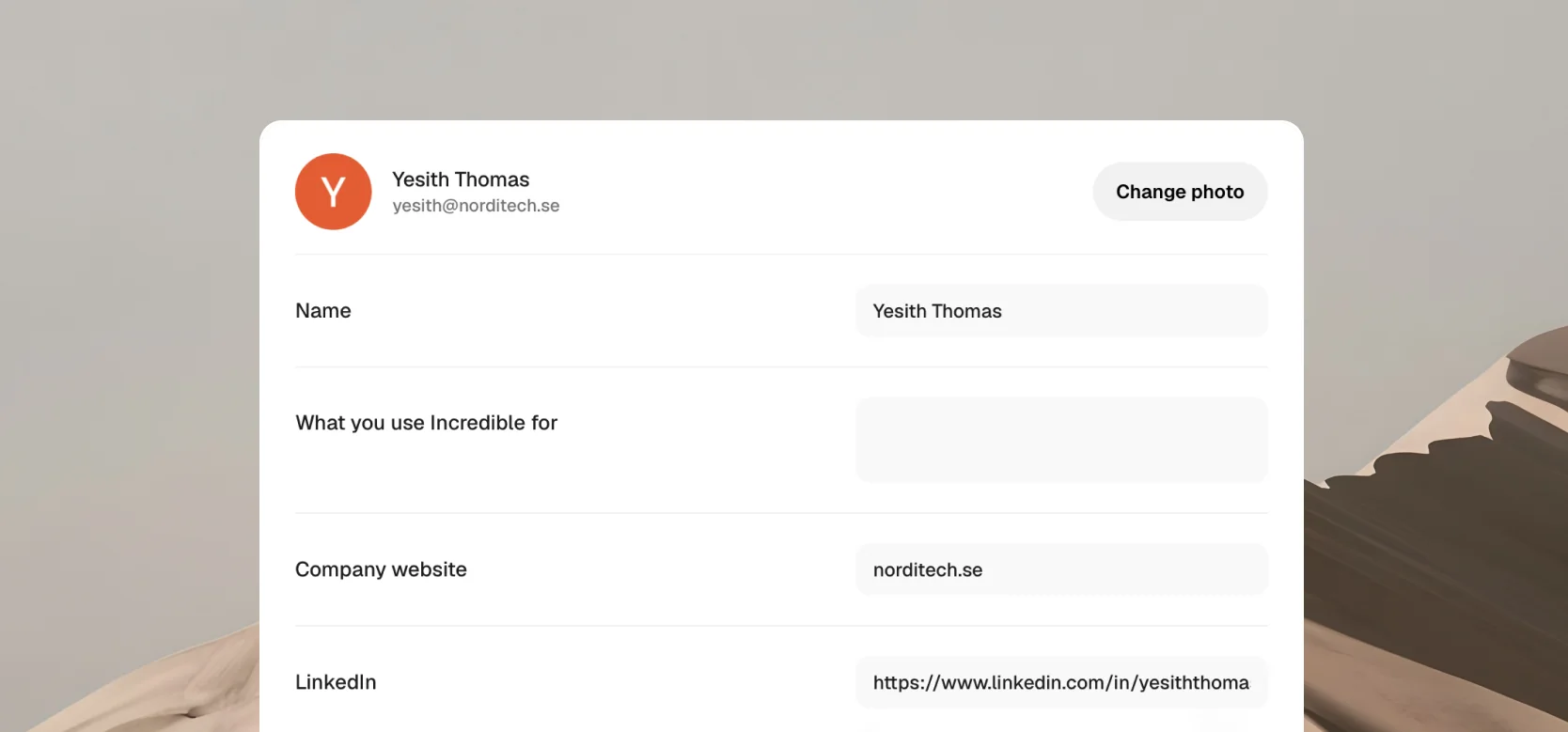
更新个人资料
打开 Settings,再点击 Account。在这里你可以更换头像,并修改你的名字、你用 Incredible 做什么、公司网站和 LinkedIn 主页。你一边输入,改动就会自动保存。
重置密码
如果你用邮箱和密码登录,在登录界面点击 Forgot password?,然后按提示操作。如果你是用 Google 注册的,就没有密码需要重置,点击 Continue with Google 登录即可。
用邮箱和密码登录的?你也可以在 Settings 的 Account 中修改密码:点击 Change password。
退出登录
打开 Settings,再点击 Account,向下滚动,点击 Sign out。你随时可以重新登录。
删除账号
打开 Settings,再点击 Account,滚动到 Delete account。删除账号会抹掉你的账号及其中的全部内容。
重看导览
打开 Settings,再点击 Account,然后点击 Replay the tour 旁边的 Replay,就能再看一遍 Incredible 的欢迎演示。
需要帮助?
如果你无法登录,或者账号方面需要帮助,请联系我们。